
Introduction
Peppol (Pan-European Public Procurement On-Line) is a standardized network designed for the secure and efficient exchange of electronic documents, such as invoices and orders. Originally developed for use across Europe, Peppol is increasingly being adopted by countries outside the continent, becoming a global leader in e-invoicing and digital procurement.
The Peppol network supports all types of transactions—B2C (Business to Consumer), B2B (Business to Business), and B2G (Business to Government)—depending on local legal requirements.
How the Peppol Network Works
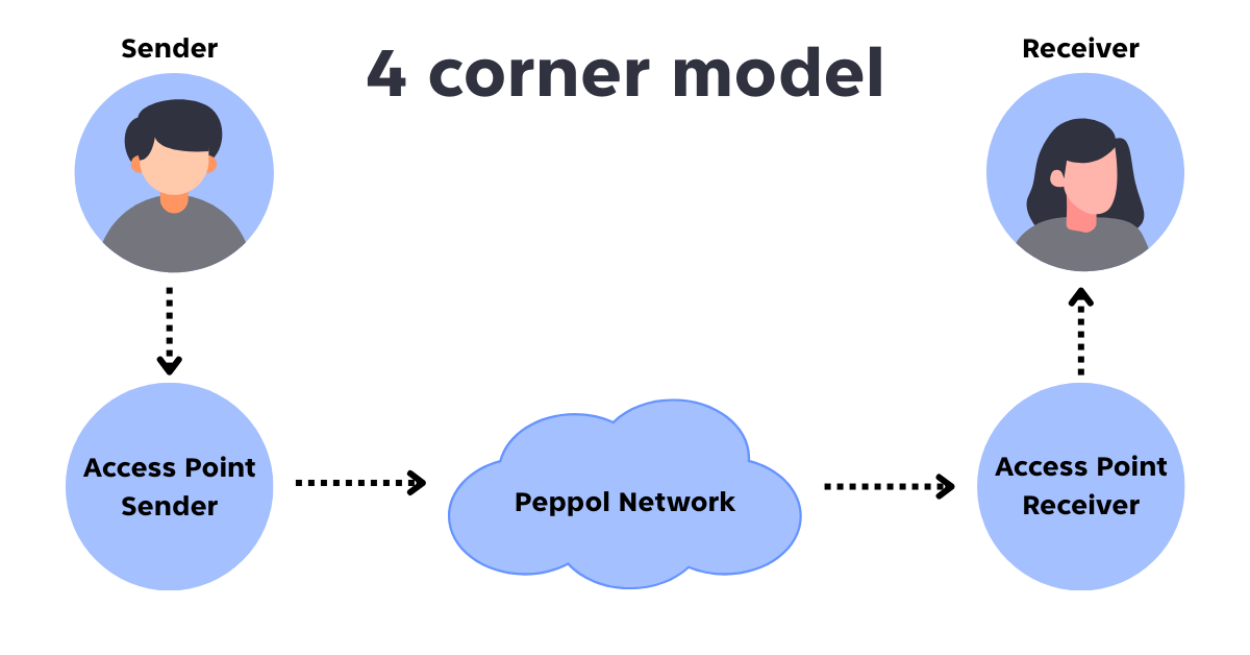
Peppol operates using a four-corner model. In this structure, each trading partner (sender and receiver) connects to the network through a certified Peppol Access Point (AP) - gateway. When a document is sent, it passes securely through the sender’s AP, across the Peppol network, and is delivered by the recipient’s AP to their business system. This model ensures interoperability, security, and standardization across borders and systems.
Prepare your Billit account
As we already mentioned, sending documents through the PEPPOL network requires the use of a PEPPOL Gateway. For this purpose, we have chosen to work with one of the leading PEPPOL Gateway providers — Billit.eu.
To send documents, you will need a Billit account, and you can create one right away here:
Once your Billit account is ready here are the details you will need from it for the Clock Hospitality Cloud configurations.
Log in to your Billit account
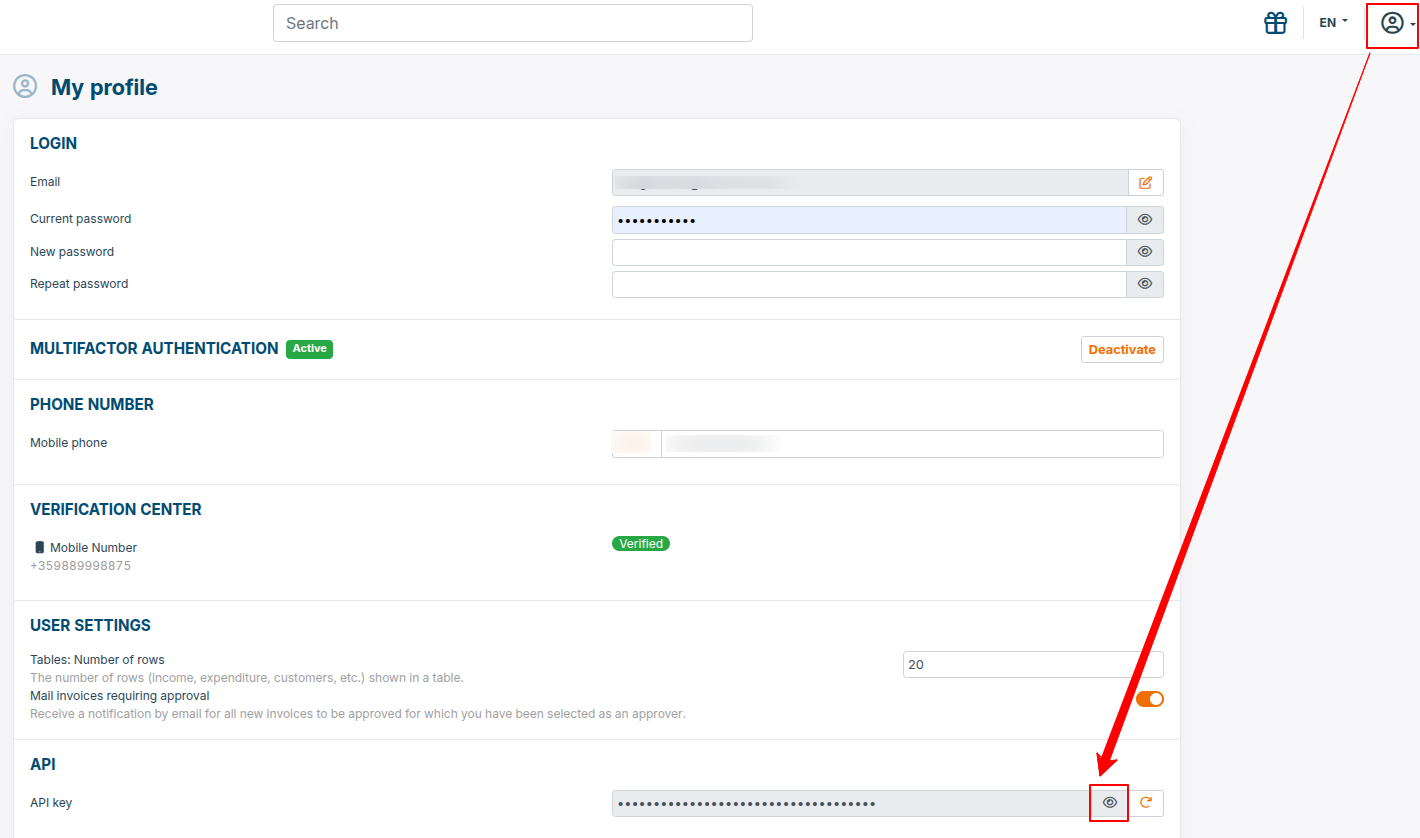
- API Key. Collect your API key as show bellow:
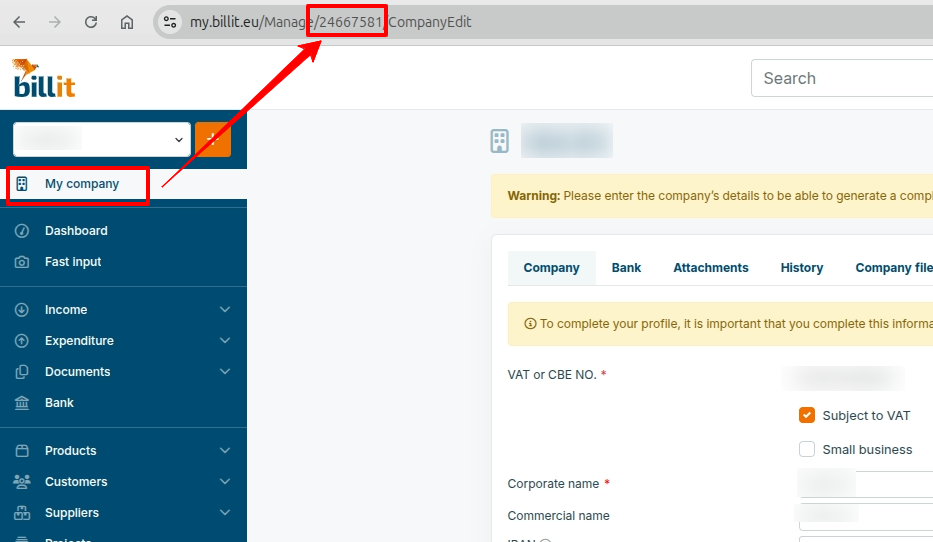
- Party ID. Collect your Party ID as show bellow:
Activation
Activate the integrarion from AppConnector(Settings > AppConnector) under "e-Invoicing" category.
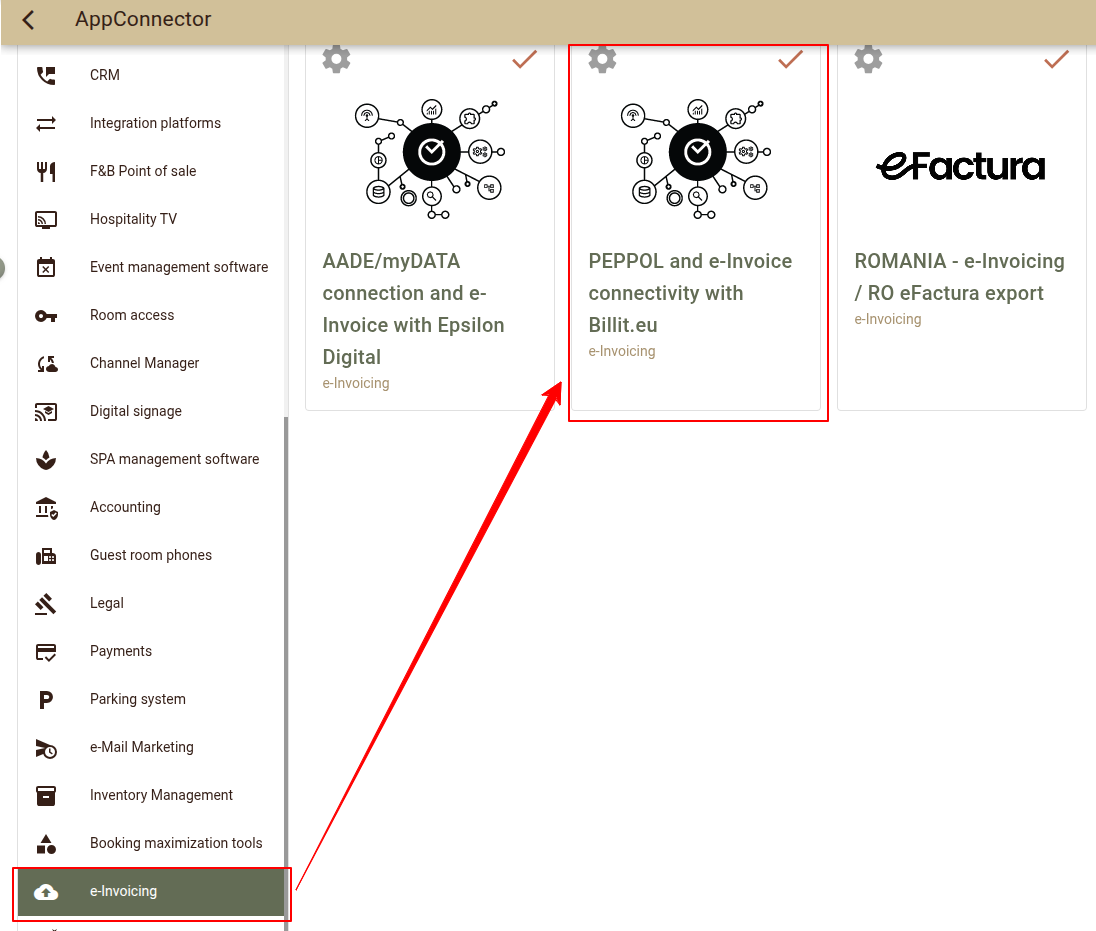
Once the integration is activated open Settings.
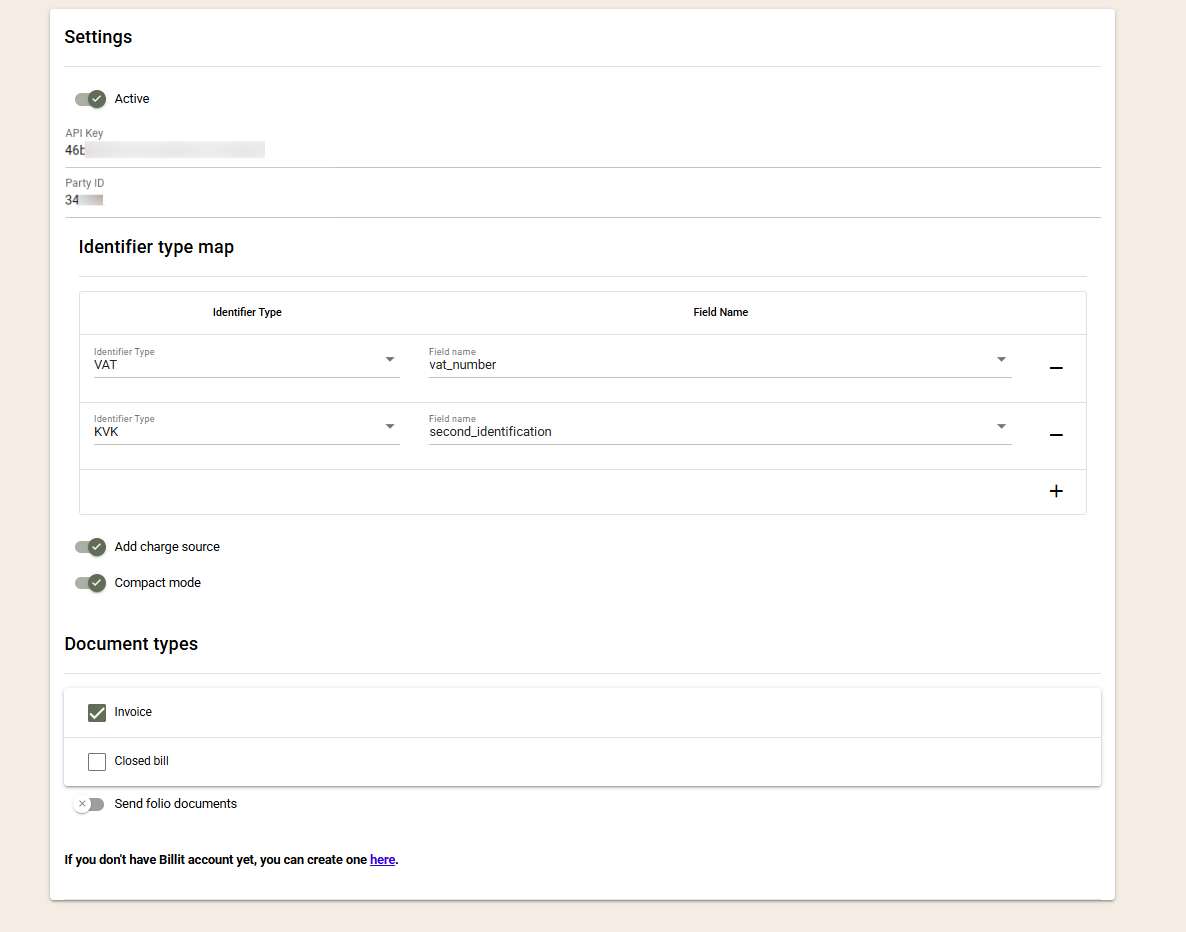
- Active - Select if the interface should be active and send documents.
- API key - Paste here your Billit API key.
- Party ID - Paste here your Billit Party ID.
- Identifier type map - The Recipient Identifiers section is used to configure the identifier(s) that uniquely identify the invoice recipient within the PEPPOL network (or another supported e-invoicing network). These identifiers allow the network to determine where the electronic invoice should be delivered. You can configure one or more identifiers, such as KVK, OIN, VAT, and others. If multiple identifiers are configured, all available identifiers are included in the document, allowing the receiving network to automatically select the appropriate one based on its priority rules. This also enables document delivery outside the PEPPOL network (for example, to Chorus Pro in France), supporting country-specific electronic invoicing requirements.
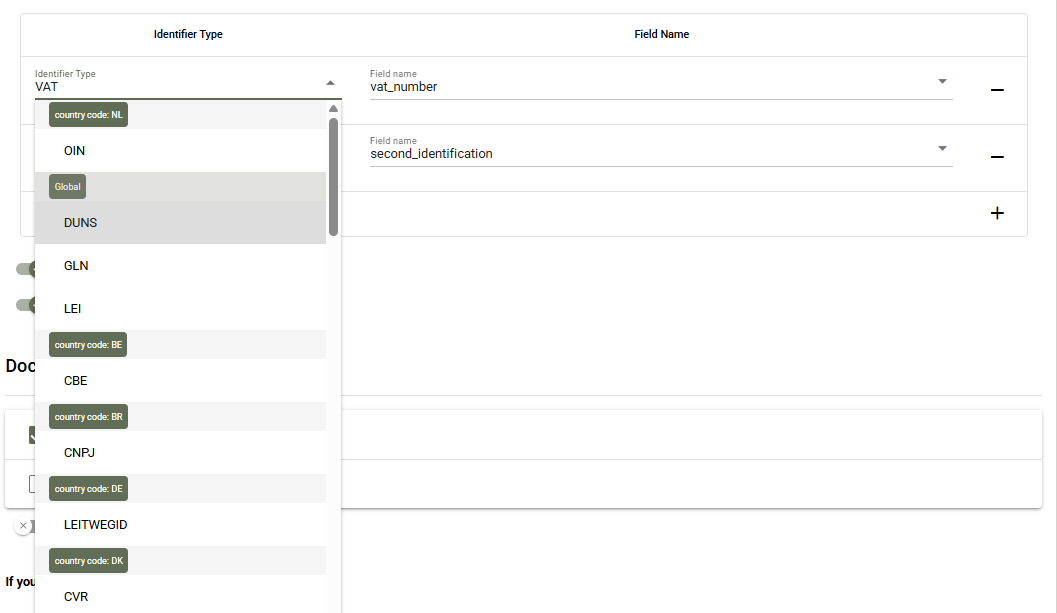
*Important: If the identification of the receiver is not stored in any of the standard company fields you may need to create a Company custom field for this purpose. To do so, navigate to Settings-> All settings -> Company custom fields to create the appropriate field.
- Add charge source - Enable it to add the charges source for the invoice. The source most often contains details of the booking, including the period of stay and the main guest;
- Compact mode- Select how detailed the view of the PEPPOL document would be:
- Compact mode disabled – Every charge is exported separately.;
- Compact mode enabled – Charges are grouped analogously to the Compact view of folios:
- grouping by tax % and print_text;
- when print_text is missing, the text field is used;
- since PEPPOL requires a quantity (qty) field, it is always submitted with a value of 1.
- Document types - Select the document types which should be sent via PEPPOL / e-Invoicing. If the folios closed without a document type (Close as Folio option) should be exported, enable "Send folio documents?";
Use
Once configured you can have your documents sent to their recipients.
The documents are processed in batches every hour. The following documents will be processed:
- The document should be closed with a document types enabled in the configurations.
- The configured Identifier field(s) for the customer must be filled in. This is how you configure which customers will receive e-Invoices and which not.
- An overview of the processed documents as well as their status (successful or not) are available in the Audit logs (Settings -> AppConnector -> PEPPOL and eInvoice connectivity with Billit.eu > Settings > logs).
- The Purchase Order Number value from the closing folio is exported as a Reference to PEPPOL. This field is often used by customers to validate the document.
- Company contact person details are exported – First name and Last name from the Contact Info section. This information helps large organisations identify the department from which the expense was made.
- Folio remarks are exported as Comments in the PEPPOL document. They often contain important information that needs to reach the customer.
- Charge printe text - When the charge print text is added it will be exported as a charge name.