
As of 1 March 2026, the Belgian government will increase the VAT rate applicable to:
Accommodation services
Breakfast
Tourist tax (which is also subject to VAT in Belgium)
The VAT rate will increase from 6% to 12%.
Due to specific transitional rules, we would like to provide guidance on how to implement this change in Clock in the most automated and error-free way possible.
1. Applicable VAT Rules
The new VAT rate applies as follows:
Bookings made on or before 28/02/2026 for stays taking place on or before 30/06/2026 → 6% VAT
Bookings made on or before 28/02/2026 for stays taking place after 30/06/2026 → 12% VAT
Bookings made from 01/03/2026 onwards, regardless of stay dates → 12% VAT
2. Automating the VAT Change in Clock
To automatically update the VAT rate in:
Charge templates
Charges in open folios (closed folios are not affected)
please use the Tax Change Policy tool.
How to access it
Settings → All Settings → Charges & Taxes → Tax Change Policy
Click the green “+” button (upper right corner) to create a new policy.
3. How to Configure the Tax Change Policy
On the policy setup screen:
Enter a clear description explaining the VAT change (e.g., “Belgium VAT increase from 6% to 12% effective 01/03/2026”).
Select whether to:
✅ Update charge templates
✅ Update charges in open folios
In the “After revenue date” field, enter:
30/06/2026
This is very important.
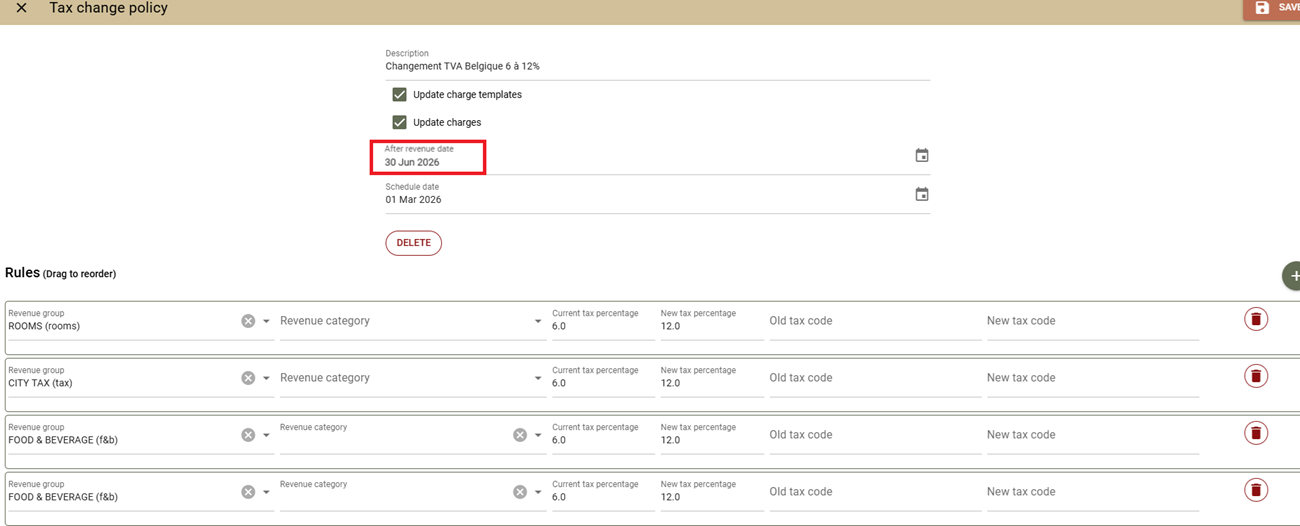
The system will update only charges with a revenue date after 30/06/2026, ensuring that:
Stays up to and including 30/06/2026 remain at 6%
Stays after 30/06/2026 are updated to 12%
4. Important Pre-Change Checks (Before 01/03/2026)
Before the scheduled change date, please:
Review the affected revenue groups (e.g., Rooms, Food & Beverage, City Tax).
Carefully check the revenue categories, especially if you have multiple categories related to breakfast.
Ensure the correct revenue groups and categories are selected in the Rules section of the tax policy.
5. Post-Change Verification (On or After 01/03/2026)
After the automatic update runs:
Verify that charge templates reflect the 12% VAT.
Check bookings with stays after 30/06/2026 to confirm VAT was updated correctly.
Confirm that bookings up to and including 30/06/2026 still retain 6%.
6. Bookings Overlapping June and July 2026
For bookings created before 28/02/2026 where the stay spans both VAT periods (e.g., June and July):
If invoicing takes place in July, 12% VAT will apply to the full stay.
Since the Tax Change Policy updates only charges with revenue dates after 30/06/2026, you will need to manually update VAT from 6% to 12% in these bookings after 01/03/2026.
How to locate such bookings
Go to:
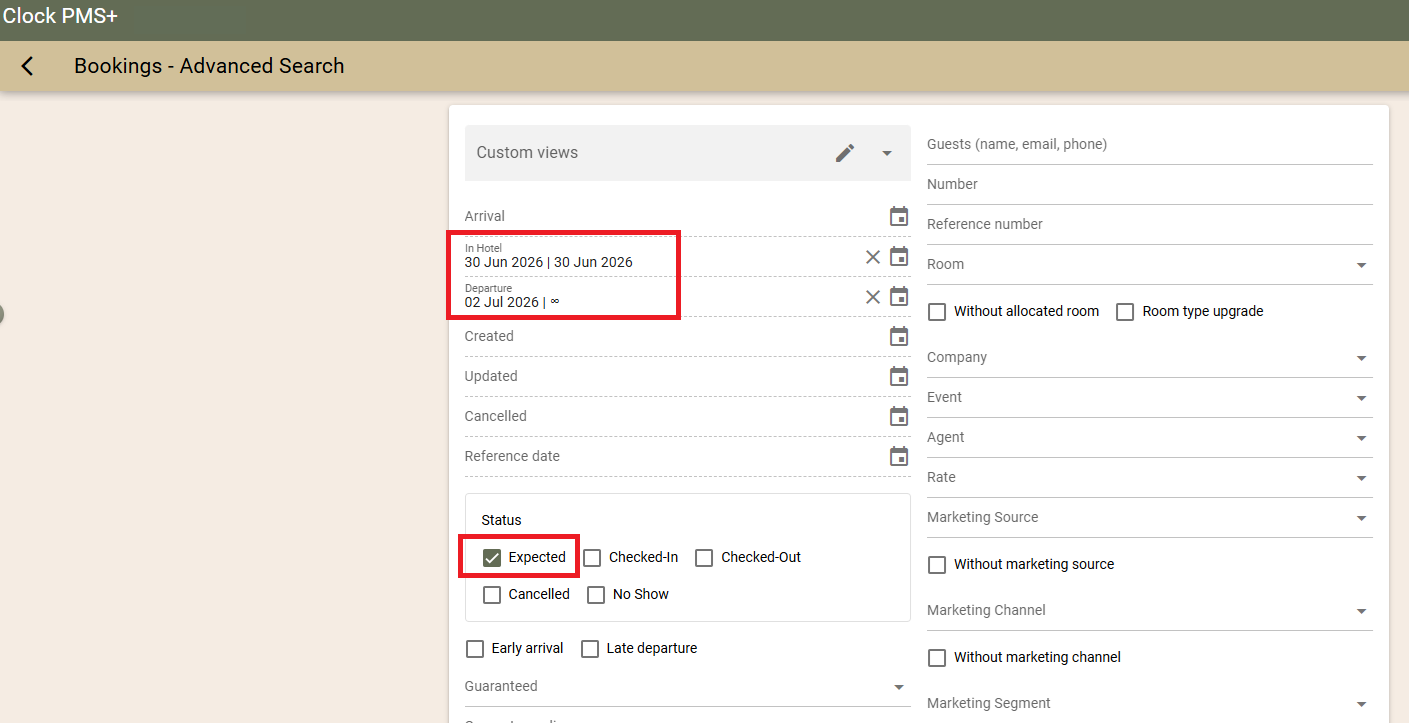
Booking → Advanced Search
Use filters such as:
“In Hotel” on 30 June 2026
“Departure” from 02 July 2026 onward
Status: “Expected”
To update them in bulk
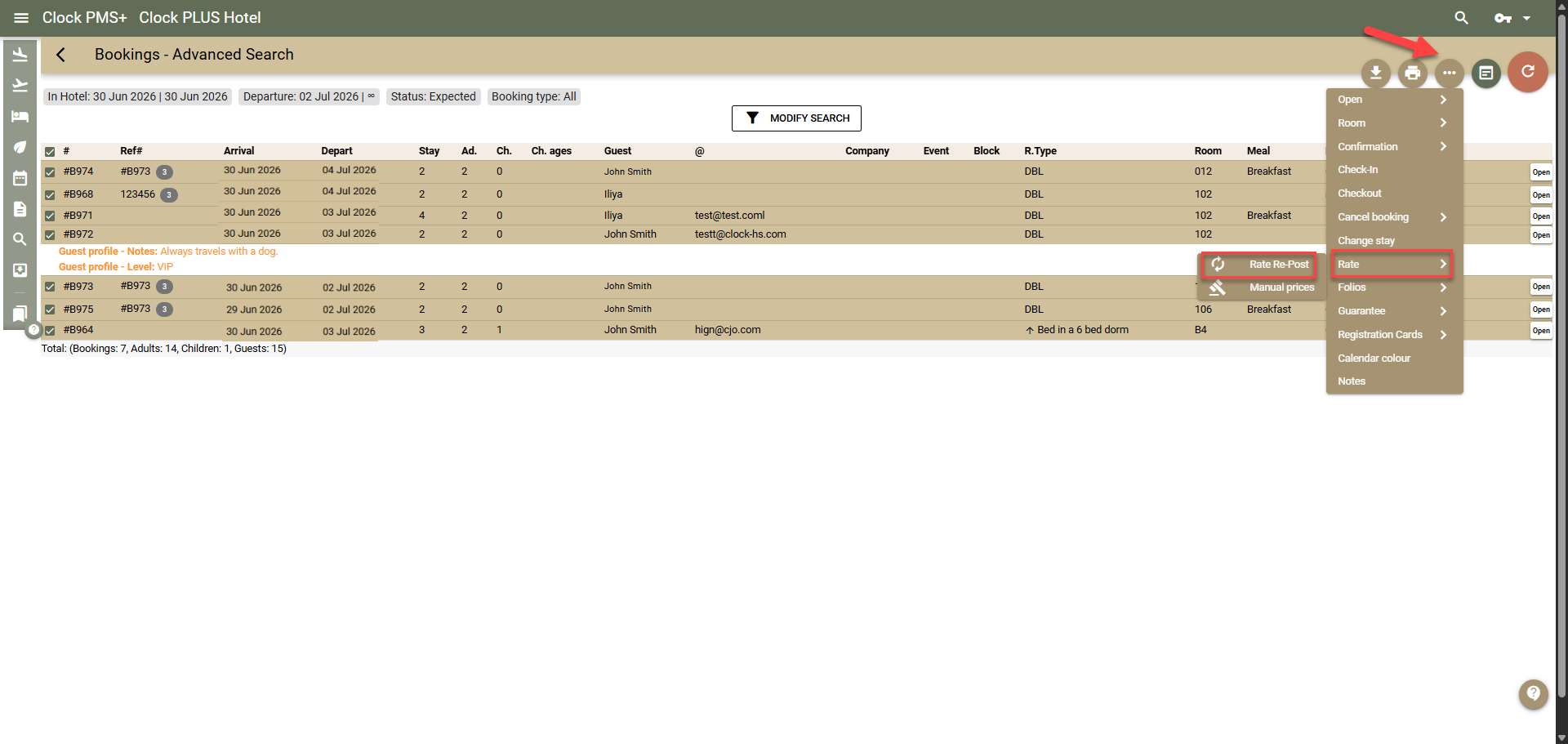
Select all relevant bookings.
Click the three-dot menu (upper right corner).
Choose Rate.
Select Rate Re-post.
This will recalculate the booking and update VAT from 6% to 12%.
7. Important Considerations
Monitor Bookings That Must Remain at 6%
After 01/03/2026, if a booking created before 28/02/2026 (with stay up to 30/06/2026) is recalculated (automatically or via Rate Re-post), VAT will update to 12% because the charge templates will already reflect 12%.
If this happens, you must manually revert VAT to 6%.
We recommend:
Adding internal notes to such bookings.
Ensuring invoices are not issued before confirming VAT is correctly set to 6%.
Modifying Stay Dates After 01/03/2026
If you modify the stay period of bookings created before 28/02/2026:
A rate re-post will automatically occur.
VAT may automatically update to 12%.
Before making such changes, we strongly advise confirming with the Belgian VAT authorities whether VAT should remain 6% or change to 12%, depending on the new stay dates.
8. Support Article
You can find detailed instructions about the Tax Change Policy tool in our support article here.